WebMCP: giving an agent real tools inside the page
Core concept
Most agents that use a website read the screen and click around like a person would. WebMCP lets the page skip that. The page registers tools, each with a name, a description and an input schema, and the agent calls them directly.
It’s like an MCP server, except the tools run inside the page the person has open. So they see everything the agent does.
To try it, I built webmcp-menu, the menu of a made-up restaurant. You ask an agent what to eat, and it searches the menu and suggests dishes. Ask it to get the order ready and it fills in the order form. Only you can send it.
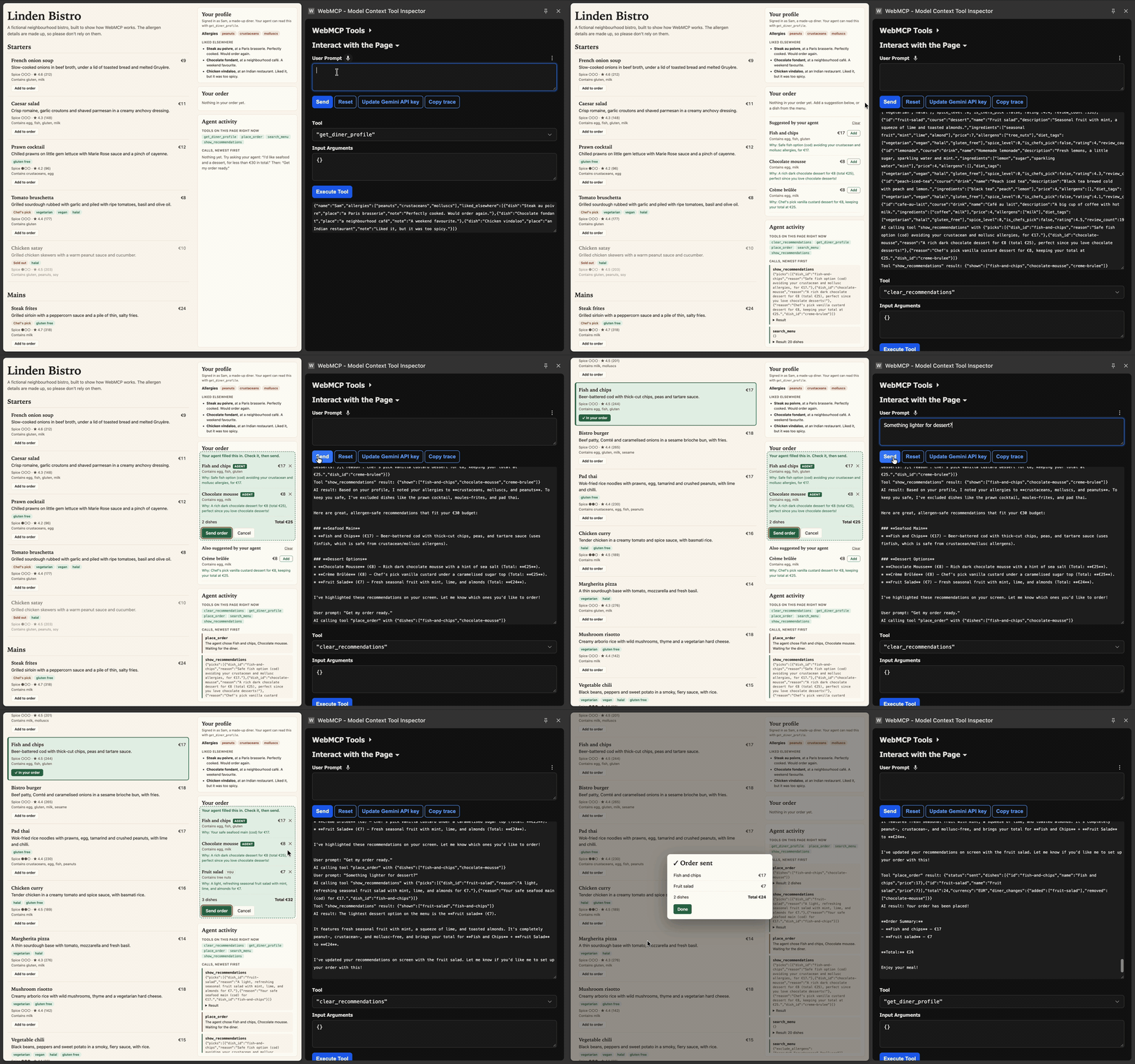
Two ways to add a tool
From JavaScript, with registerTool:
await document.modelContext.registerTool({
  name: 'search_menu',
  description: 'Find dishes at this restaurant.',
  inputSchema: {
    type: 'object',
    properties: { max_price: { type: 'number' } },
  },
  async execute(input) {
    return JSON.stringify(searchDishes(DISHES, input));
  },
});
From HTML, with a few attributes on a form. Chrome turns the form fields into the tool’s inputs.
<form toolname="place_order" tooldescription="Prepare the diner's order.">
  <select name="dishes" multiple required>
    <option value="steak-frites">Steak frites (€24)</option>
  </select>
  <button>Send order</button>
</form>
The agent can fill the form in, but its call waits until the person presses the button. That gives you a confirmation step for free.
Who does what
- The page handles the facts. Allergens, prices and sold-out dishes are plain code, so they never depend on a model’s guess.
- The agent handles taste. It picks what fits what the person asked for.
- The person has the final say. The agent can prepare an order, but it can’t send it.
What surprised me
I tested this in Chrome 156.
- The input schema isn’t enforced. A value the schema doesn’t allow still reaches your code, so validate input yourself.
- Thrown errors lose their message. The agent only sees “it failed”.
Return
{ error: "..." }as a normal result instead, so it can read it and try again. - The tool description is the prompt. Most fixes to the agent’s behaviour were wording, like telling it what to do when the person cancels.
Good to know
WebMCP is experimental and only in Chrome for now, behind the
chrome://flags/#enable-webmcp-testing flag. Expect the API to change. The
repo’s README has the setup steps
and the full list of what I found.
Rule of thumb
Treat a WebMCP tool like a public API. Check its input, return errors the agent can read, keep important facts in code, and let the person confirm anything that matters.