Instagram Insight
ActiveAlways-on Android tablet dashboard for my wife's Instagram Creator account: wake-triggered, kiosk-pinned, and now reading everything from the Instagram Agent instead of calling Meta itself.
Highlights
- 8.6s to 1.6s refreshAbout 30 Graph API calls per wake became five calls to the agent, which has already collected everything.
- Kiosk dashboardA double-tap wake lands on an auto-rotating six-page dashboard, pinned so nothing else is reachable.
- AI replies, human approvedComments arrive with an AI summary and draft reply, and nothing is posted until someone confirms it.
- Undocumented API quirkTraced silently empty comment responses to a Meta Live-mode requirement, written up as a note.
Overview
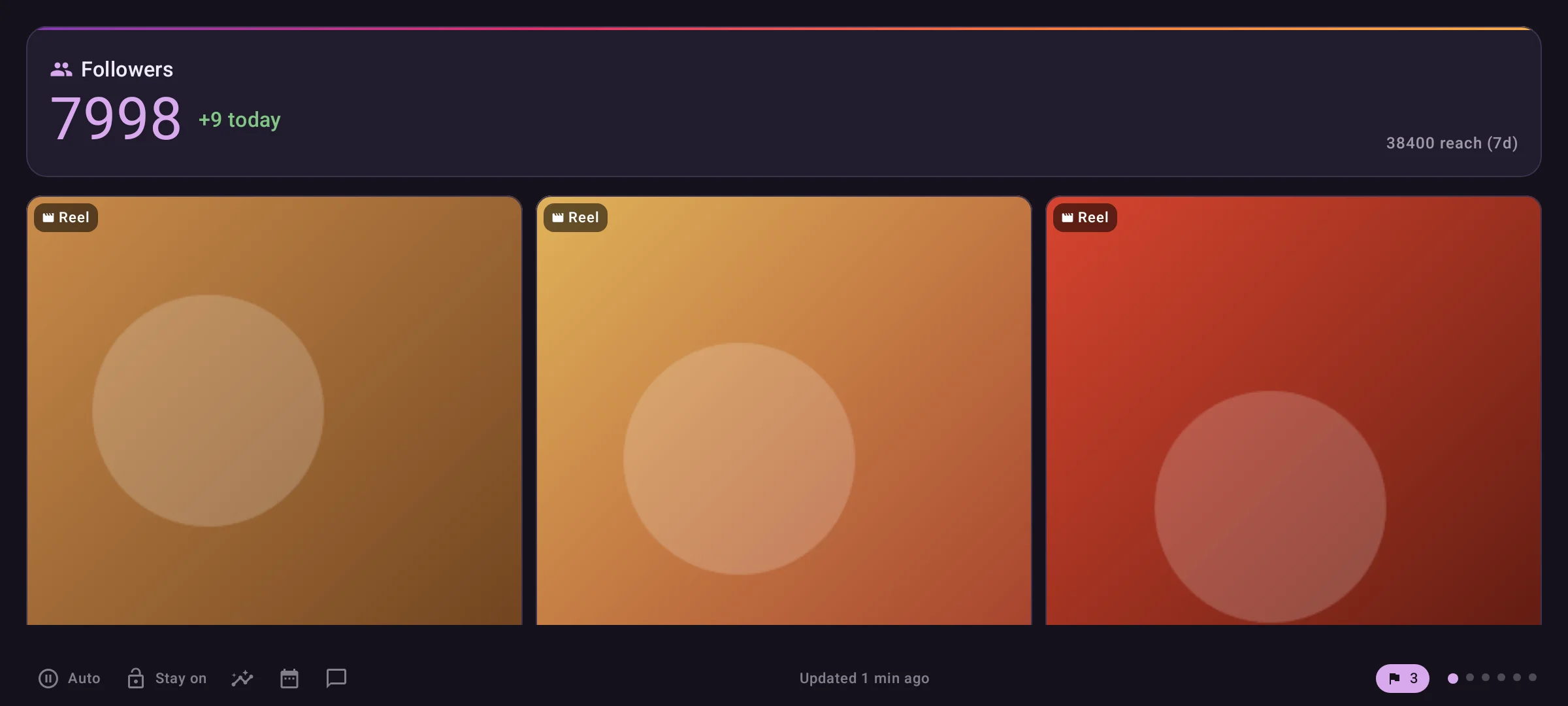
A single-purpose Android app for a tablet mounted where my wife can glance at her Instagram Creator account without opening Instagram and digging through its Insights screens. It wakes on a double-tap, refreshes, and auto-rotates through six pages: followers, growth, the latest post, totals, audience and history graphs. It is kiosk-pinned, so nothing else on the tablet is reachable.
It started with no backend at all, calling the Graph API directly and refreshing its own token. It now reads everything from the Instagram Agent, which collects the data in AWS, and shares its comment to-do list with the Insight Dashboard website.
Problem
- A passive, always-current view, not another app to open. The point is a glance while walking past, not a session inside Instagram.
- The tablet is not always plugged in. Anything that runs in the background costs battery for updates nobody is looking at.
- Meta’s setup and docs don’t match reality. Getting comments to return
anything needed a tester invite accepted by the account owner, a scope
added later, and the app switched to Live mode, none of which errors when
missing.
SETUP.mdin the repo has the full walkthrough. - Android kiosk behavior isn’t obvious. Screen Pinning, show-when-locked and turn-screen-on had to be combined by trial and error.
- A device on a wall is a bad place for a write-scoped token. A lost tablet leaked 60 days of full account access, with no way to revoke it short of redoing the consent flow.
Approach
The app runs unattended on a device nobody is debugging, so every failure has to degrade gracefully. A failed refresh never clears a good cache: the dashboard always shows the last successful fetch rather than a blank screen. Anything that is not guaranteed to work gets its own call and its own try/catch, never batched with calls that are. And the refresh only runs on wake, with two narrow, self-terminating background jobs as the only exceptions.
What I built
Dashboard and kiosk modeDoneA double-tap wake lands on a six-page auto-rotating dashboard, refreshed on wake and cached for failures.
GoalGet from a double-tap on a sleeping tablet to a current dashboard, with no lock screen and no background polling draining the battery.
refreshDashboard() is the single entry point, called from onResume() on
every wake and cold launch. It writes to DashboardCache, and returns a
failure without ever deleting what is already cached.
Kiosk mode is three settings working together:
setShowWhenLocked(true)andsetTurnScreenOn(true)inonCreate, so the wake skips the lock screen.- Android Screen Pinning, which does not survive a reboot, so an adb shortcut re-pins and relaunches the app.
- A token pushed over adb through
onNewIntent, since a pinned, running activity never goes throughonCreateagain.
Refresh trigger
- Chose
- Only on wake (onResume)
- Instead of
- A background polling job
- Why
- The tablet isn't always plugged in; polling would drain battery for updates nobody sees between wakes.
Token storage
- Chose
- EncryptedSharedPreferences pinned to security-crypto 1.0.0
- Instead of
- The 1.1.x alpha MasterKey builder API
- Why
- Google deprecated the later alphas for reliability issues; 1.0.0 is stable and enough for a couple of stored values.
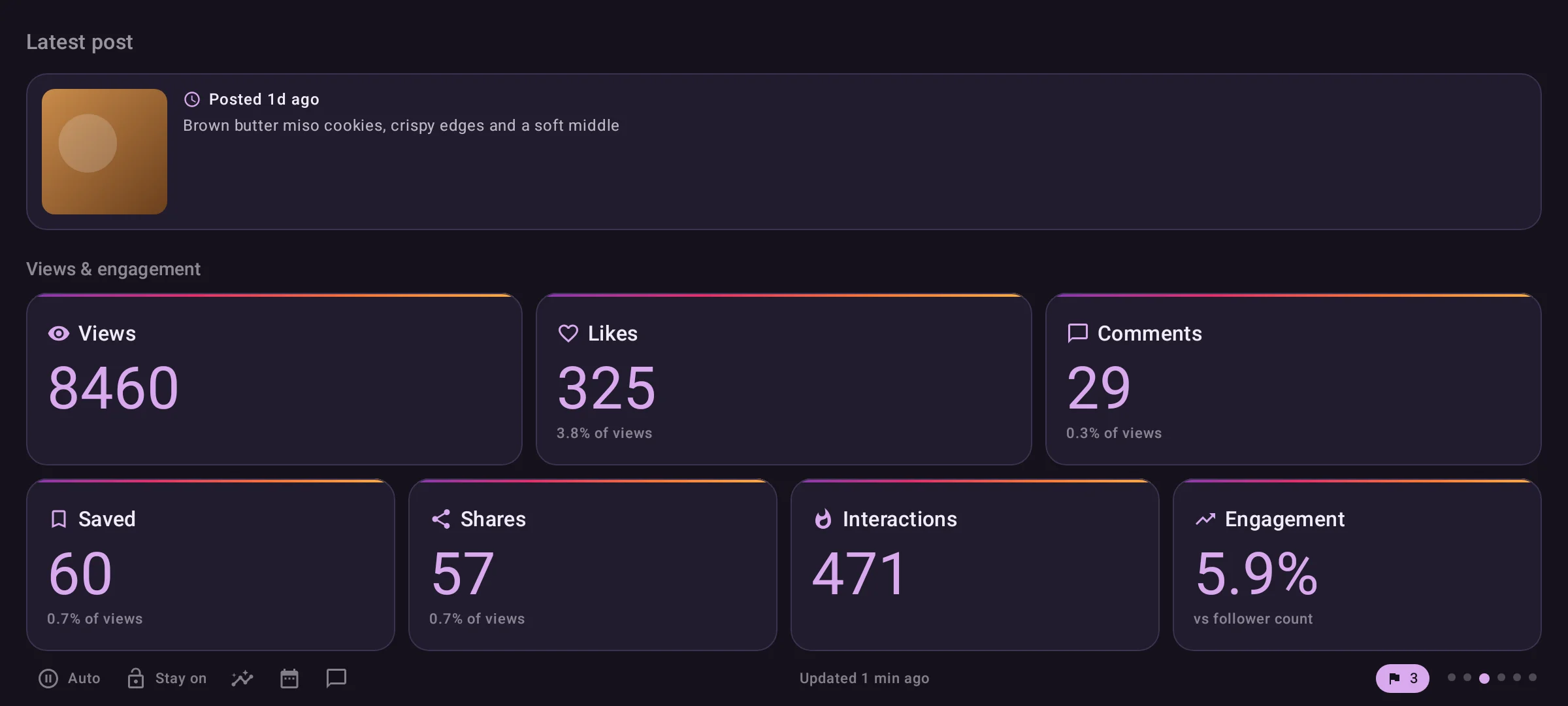
Latest post and post insightsDoneA latest-post page and tap-through detail pager, with each unreliable metric fetched on its own.
GoalShow how the newest post is doing in its first hours and days, with the richer metrics Instagram's own app buries (saves, shares, watch time, skip rate).
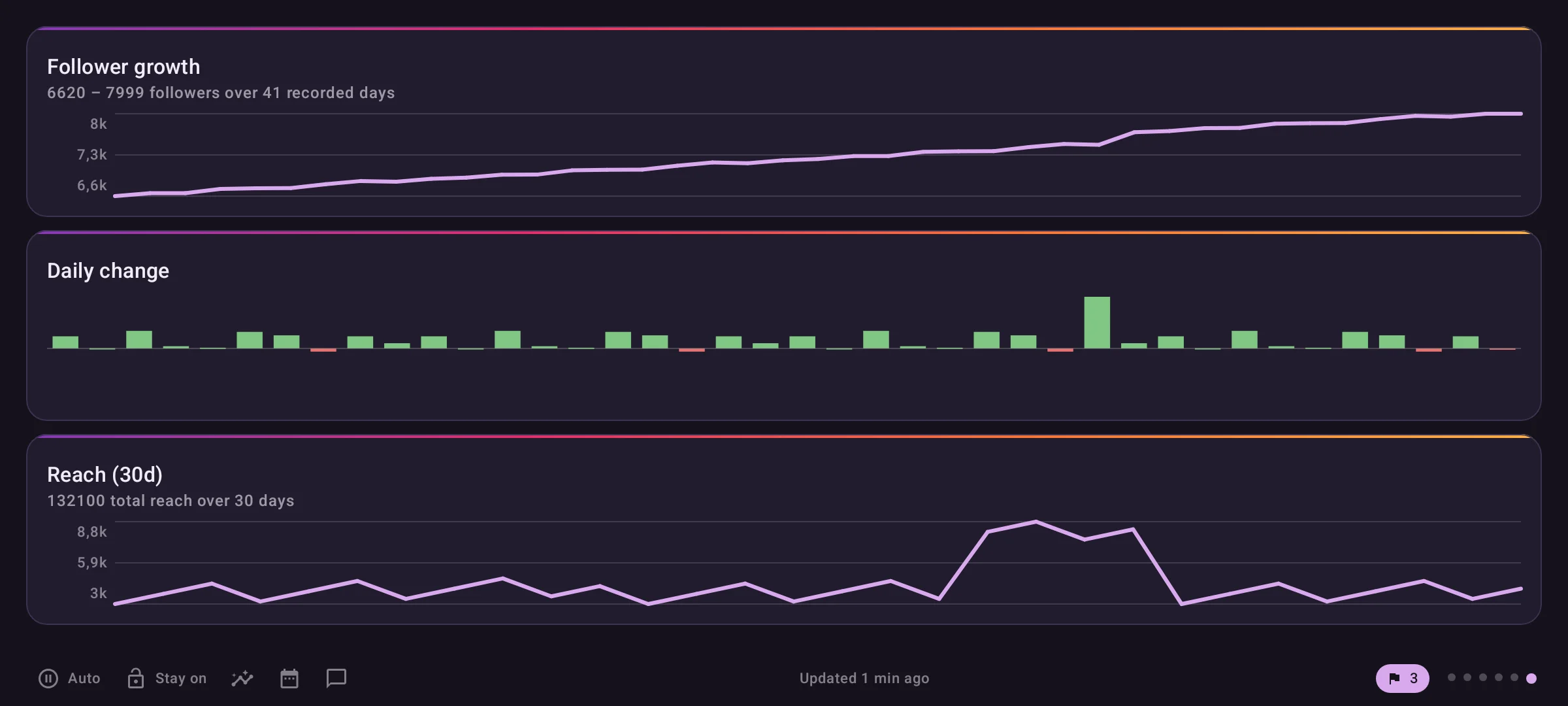
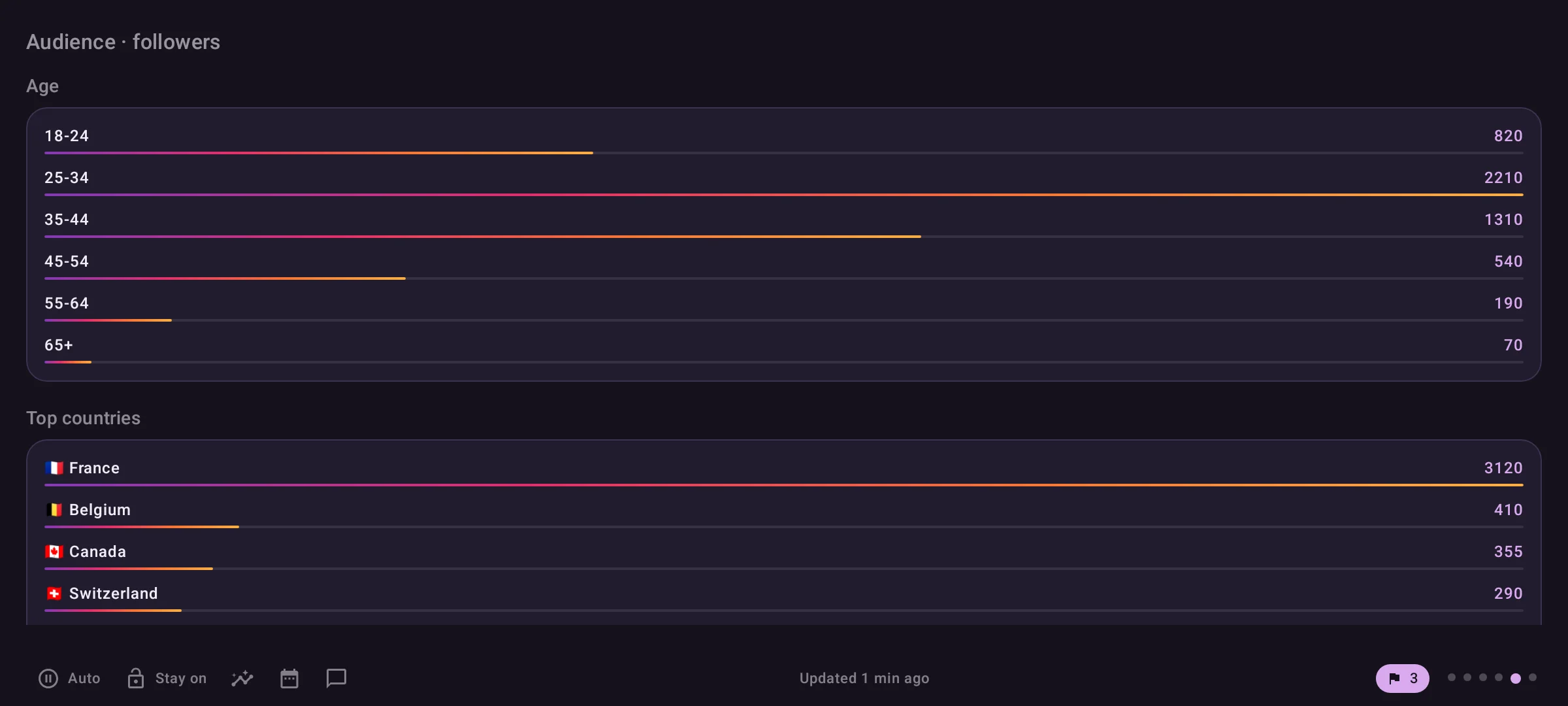
Growth, history and audienceDoneDaily snapshots build follower and per-post history locally; reach and audience come from Meta.
GoalAnswer 'how are we growing' when Meta has no follower history and only exposes a post's current totals.
Follower count has no historical API, so the app stored its own daily
snapshots (FollowerHistoryCache), and the same for each post
(PostMetricsHistoryCache). Reach does have a real time series, so it was
backfilled 30 days in one call. Those local snapshots are the only copy of
that history anywhere, which is why they were later exported and imported
into the agent.
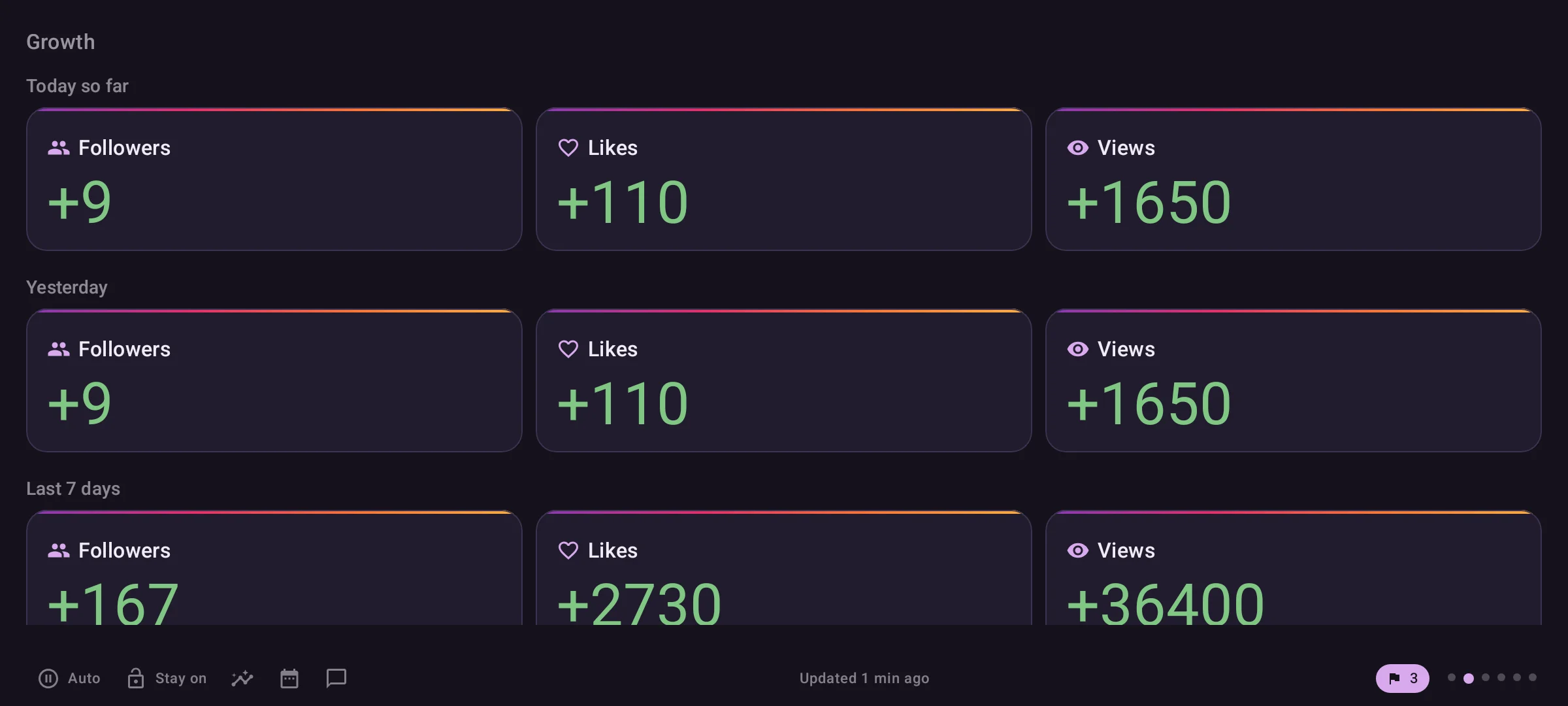
Background refresh exceptionsDoneTwo self-rescheduling jobs: 5-minute polling for a new post's first day, and a midnight snapshot.
GoalGet two numbers the wake-only design cannot: a fresh post's first-hours trend, and a real midnight baseline for 'today so far'.
New-post tracking
- Chose
- A 5-minute self-rescheduling chain of one-time jobs
- Instead of
- A PeriodicWorkRequest
- Why
- WorkManager's periodic floor is 15 minutes, too coarse for a first-24h trend. Re-reading which post is latest on every run also picks up a post published mid-window.
Growth page's baseline
- Chose
- A one-time job pinned to local midnight
- Instead of
- Whatever the first wake of the day sees
- Why
- A wake-only baseline is hours late, and missing entirely on a day the tablet is never woken.
Strategy insights and compare datesDoneTwo overlays: engagement by format and time slot, and account plus per-post change between any two dates.
GoalGo beyond the glance for the occasional deliberate question: which format works, when to post, and what changed between two dates.
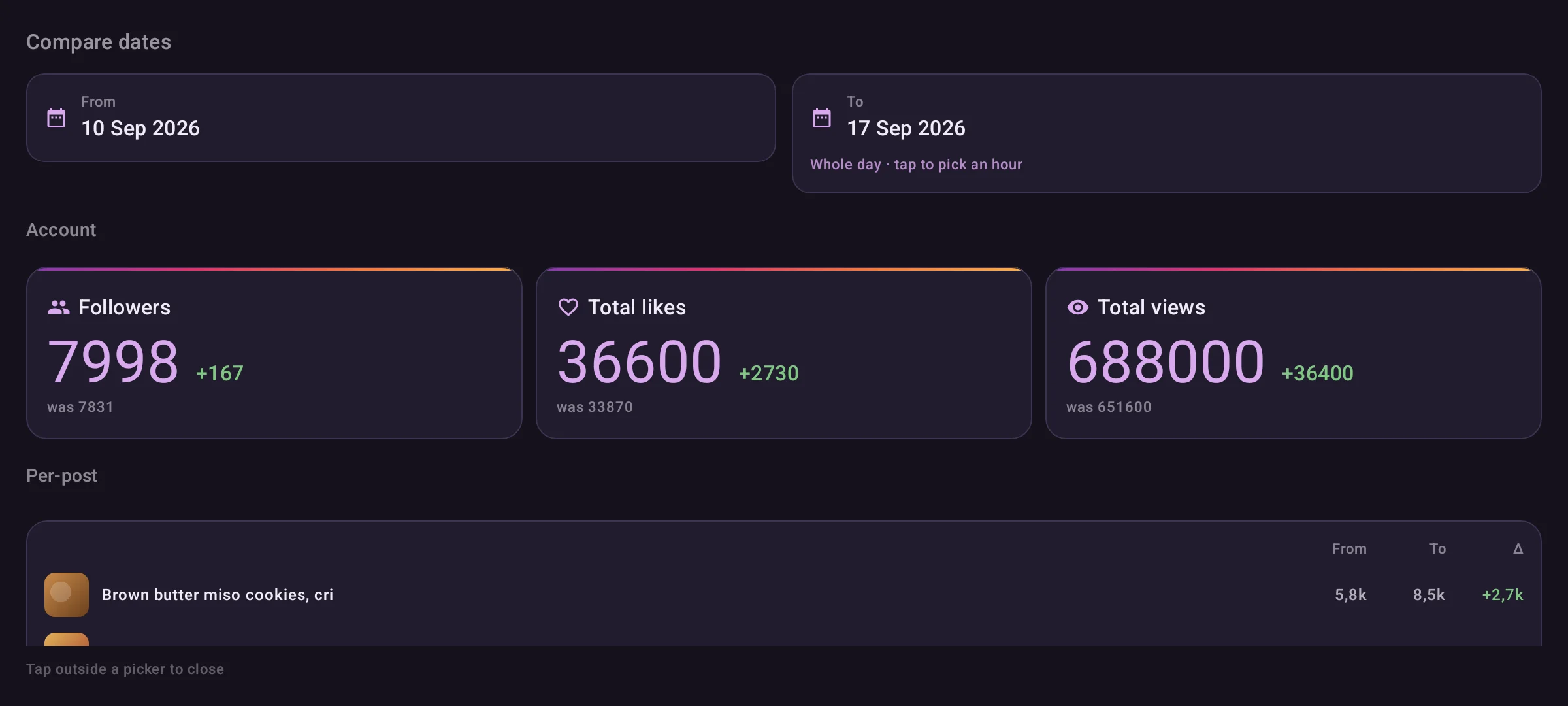
Both are overlays opened from the bottom bar rather than pages in the pager. Unmounting the pager stops auto-rotation for free, and a detailed table is not something to rotate past every few seconds.
Comments with AI reviewDoneUnseen comments grouped by post and filterable by tag, each with an AI summary and a draft a person confirms.
GoalSurface new comments on the tablet, then act on them (reply, hide, delete, acknowledge) with the agent's analysis to help, without ever posting something nobody approved.
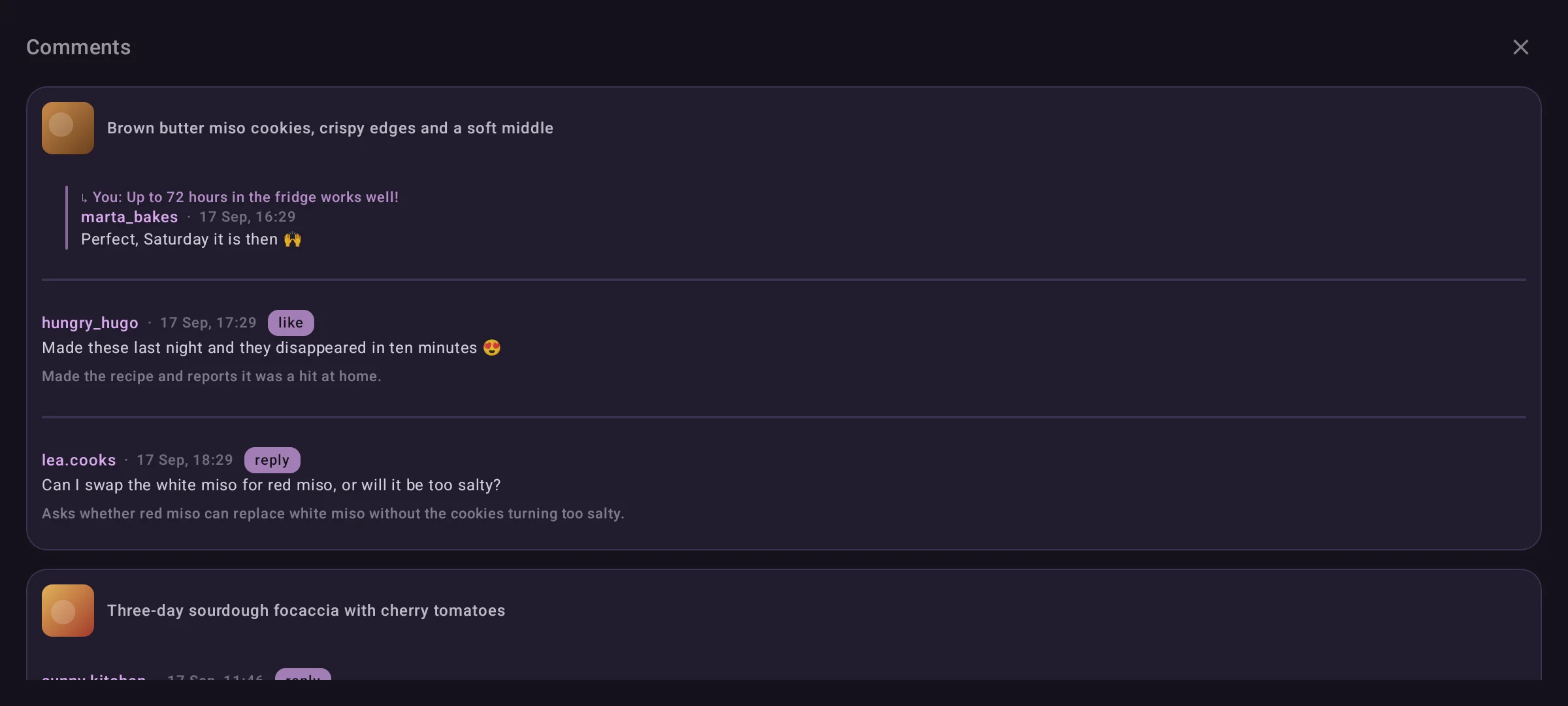
Every write follows write-then-report: post to Instagram first, then record the action with the agent only once Instagram confirms. A failed Instagram call is safe to retry; a failed recording after a successful post only retries the recording. Actions go to the same table the dashboard website writes, so a comment handled on either one leaves both lists.
- Tags. Each comment shows the agent’s tag as a coloured chip, with the same names and colours as the dashboard’s Topics page, and a row above the list filters to one kind at a time.
- Your own replies clear themselves. They are kept only as context for a thread that still needs an answer, so each sync acknowledges a reply of yours once nobody else in its thread is waiting. Before that, 43 had piled up, and the tablet listed far more than the website’s To handle.
Cutover to the agentDoneA wake refresh went from ~30 Graph calls in 8.6s to 5 agent calls in 1.6s.
GoalStop calling Meta from the tablet: make refreshes faster and take the write-scoped Instagram token off a device mounted on a wall.
It happened in two steps, each small enough to roll back:
- Comments and moderation through the proxy. The agent passes Meta’s JSON through unchanged, so the tablet’s comment threading (parent resolution, self-detection, deduplicating replies Meta returns twice) kept working untouched.
- Every metric from the agent. Posts, post detail, followers, reach and
audience come from its
/metricsroutes, mapped onto the existing UI models, so no screen changed.
| Before | After | |
|---|---|---|
| Requests per wake | ~30 to the Graph API | 5 to the agent |
| Refresh time | 8.6s | 1.6s warm |
| Metrics on screen | after the comment fetch (~25s) | before it starts |
| Instagram token | sent on every call, refreshed on-device | no longer sent or refreshed |
Tech stack
Languages
- Kotlin
App language throughout.
Frameworks
- Jetpack Compose
The six-page auto-rotating pager, the overlays (comments, strategy insights, compare dates) and the kiosk screen.
Libraries
- Retrofit
Typed calls to the Instagram Agent's management API, which also proxies comment reads and moderation.
- OkHttp
HTTP client and logging interceptor under Retrofit.
- kotlinx.serialization
JSON models for every API response and every local cache.
- DataStore
Local caches: dashboard, follower and post history, follower momentum, unseen comments.
Tooling
- EncryptedSharedPreferences
Keystore-backed storage for the tokens, pinned to security-crypto 1.0.0.
- WorkManager
Two narrow, self-rescheduling job chains that deliberately break the wake-only rule (new-post polling, midnight snapshot).
Topics
- Coil
Post thumbnails on the dashboard tiles and in comment groups.
Future improvements
- Retire the Instagram token entirely. It is no longer sent anywhere, but it still acts as the “is this tablet set up” check.
- Survive a reboot without adb. Screen Pinning has to be re-applied by hand after a restart; a device-owner kiosk would remove that step.