VideoEdit
ActiveLocal web app that turns a CapCut cooking-video export into bilingual captions and dialogue transcripts, either as SRTs or written straight back into the CapCut draft.
Highlights
- CapCut, reverse-engineeredWrites styled bilingual caption tracks straight into CapCut's undocumented draft format.
- In real useCaptions my wife's TikTok and Instagram cooking videos, in whatever language pair each needs.
- 3 Whisper passes + GeminiCode-switched dialogue transcripts merged from en/fr/ja passes and aligned to word timings.
- Peak-safe loudnessBalances voiceover volume by measured LUFS, flagging clips a flat gain can't fix.
Overview
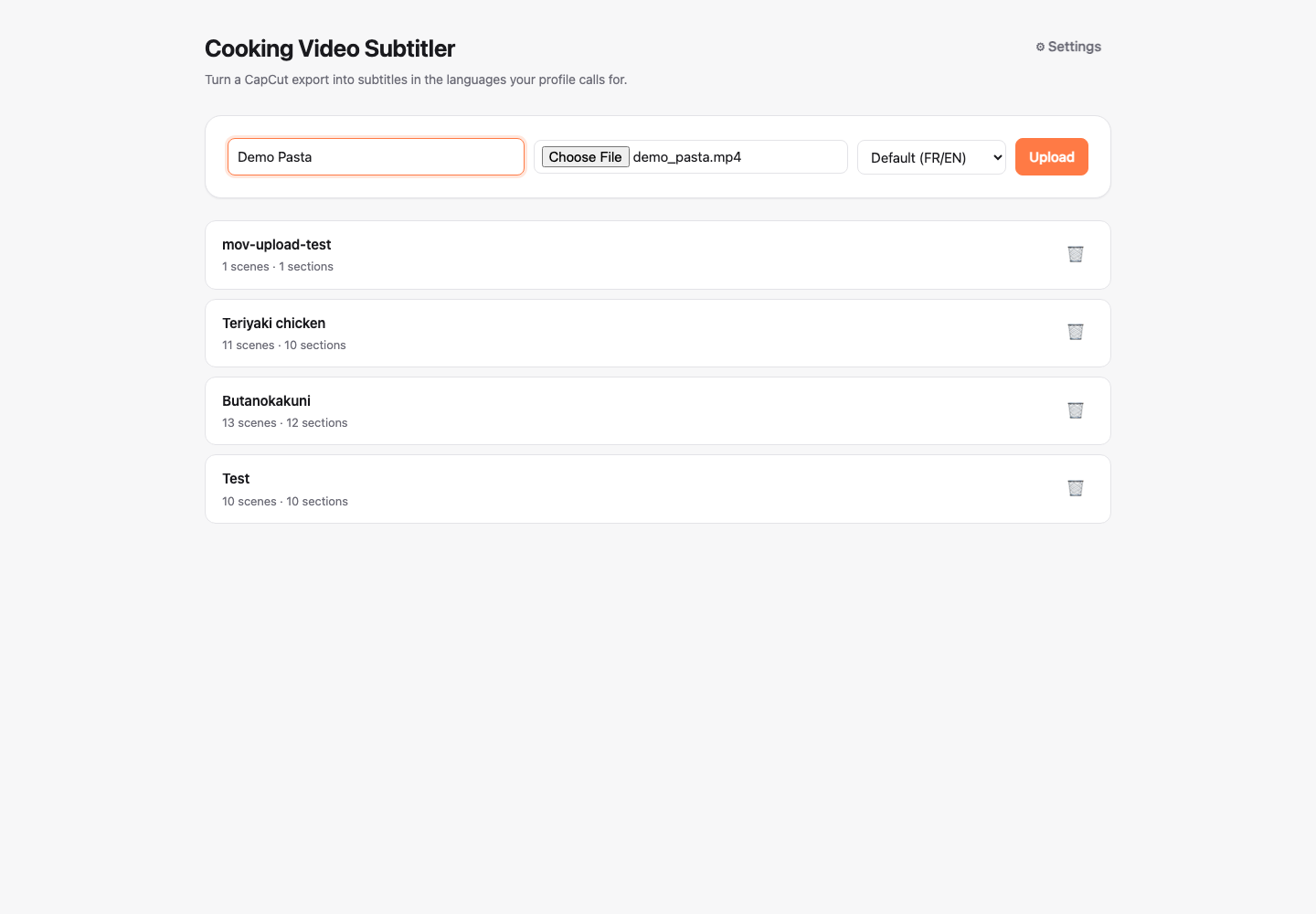
A local web app for subtitling my wife’s TikTok/Instagram cooking videos. She edits in CapCut desktop and exports an mp4. This tool splits that export into scenes, groups them into logical sections, proposes short recipe-step captions with Gemini, transcribes the tasting/dialogue moments, and hands the result back either as SRT files to import into CapCut, or written directly into the linked CapCut draft so the styling and positioning she’s already dialed in for the primary/secondary caption tracks carry over automatically.
Most of the actual engineering weight sits in capcut_captions.py and its
neighbors. CapCut’s draft format is undocumented, versioned across app
releases, and cached in memory while the app is open. Getting captions
and audio levels written into it correctly took real reverse-engineering
against a live install, not just following a spec.
Problem
- Consistent bilingual captions, without redoing styling by hand every video. She needs a short, imperative recipe-step caption style, plus a verbatim-and-translated dialogue track for tasting moments, in whatever language pair a given video needs. Doing that by hand per video is repetitive and easy to make inconsistent.
- CapCut’s draft format has no public spec. Writing captions and audio
gain directly into a
draft_info.jsonmeans reverse-engineering undocumented, versioned, partially-duplicated state (see CapCut direct-write) against a real install, not implementing a documented API. - Voiceover volume varies clip to clip. Fixing that by ear inside CapCut is repetitive and easy to get subtly wrong. A single loud transient in an otherwise-quiet clip can make a naive fix clip audio that should have stayed clean (see Balance Audio Levels).
None of these is exotic alone, but together they’re why this is a real tool rather than a five-minute Whisper script: a genuinely useful output needs consistent styling and positioning that survives all the way into the editor she actually works in, not just a technically-correct SRT file.
Phases
Nine phases so far, from the first working pipeline slice to a read-only check that catches a CapCut draft edited by hand out from under the app:
Core pipeline
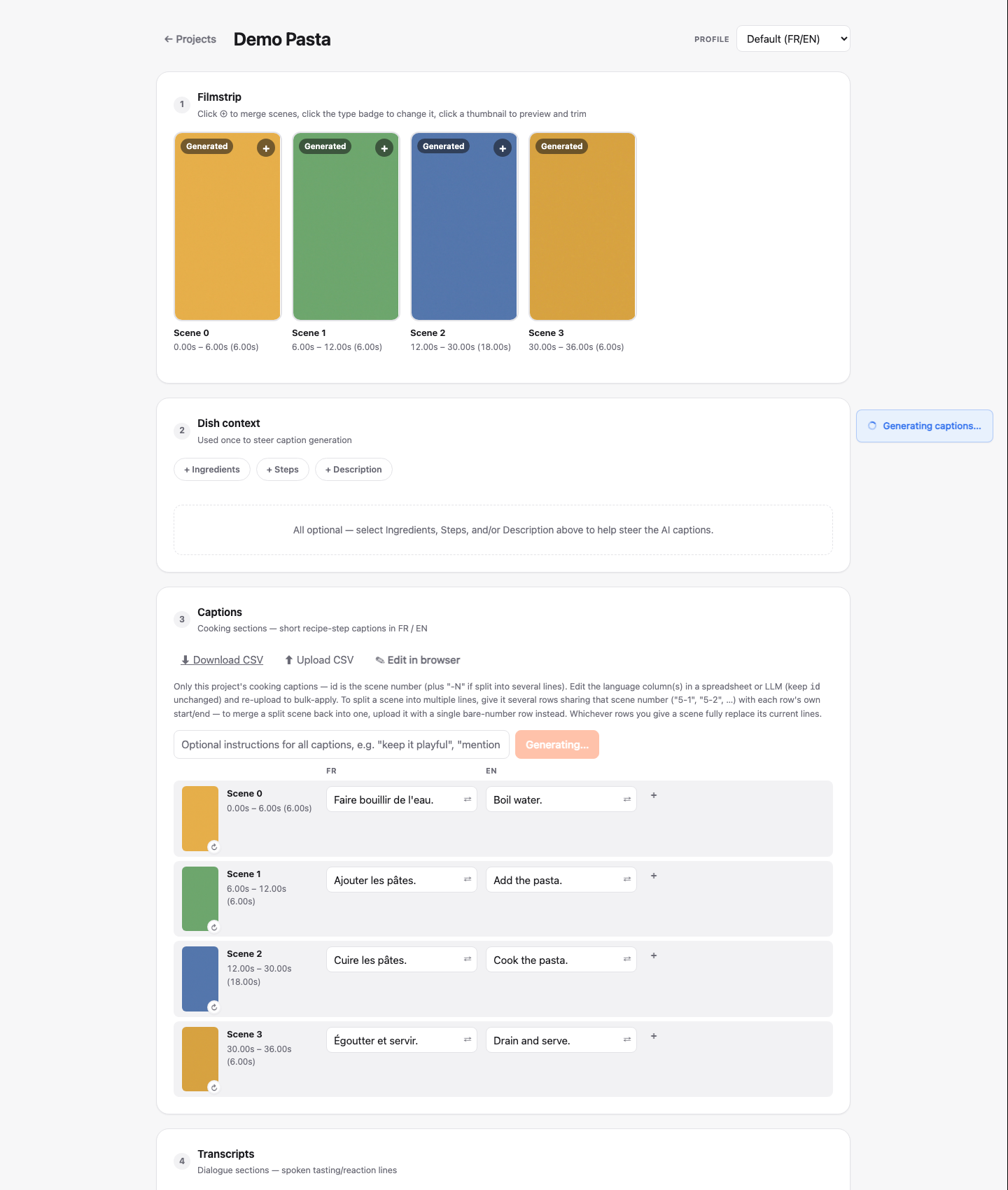
The v1 slice end to end: upload the CapCut export, PySceneDetect
(content detection, threshold ~40) splits it into scenes, adjacent scenes
get merged into logical sections in the UI, sections containing speech
are marked dialogue, dish context (name/ingredients/steps/description)
is entered once per video, Gemini proposes captions for every cooking
section in one coherent pass, dialogue sections get transcribed, and
everything is editable in the UI before exporting SRTs.
Scene
- index / start / end — one scenedetect cut
- keyframe — middle-frame jpg, saved per scene
Section
- kind — cooking / dialogue / custom
- scene_start / scene_end — the scene range it spans
- captions — dict[lang, text], the whole-section caption
- caption_lines / transcript_lines — optional split into timed sub-lines
Dialogue sections get a hybrid transcription rather than a single Gemini or
whisper pass: three forced-language faster-whisper passes for word-level
timestamps (fixed at en/fr/ja regardless of the profile’s own output
languages, purely to help Gemini tell code-switched speech apart), then
Gemini reads the audio plus all three passes and produces one merged,
code-switched transcript aligned to the whisper timings:
Dialogue section's audio clip
extracted via ffmpeg, 16kHz mono
en pass
word-level timestamps, forced to English
fr pass
word-level timestamps, forced to French
ja pass
word-level timestamps, forced to Japanese
Merged transcript
one chronological, code-switch-resolved transcript, timed against whisper
Input (v1)
- Chose
- Exported mp4 + scenedetect
- Instead of
- Parsing CapCut's own draft_content.json for an exact cut list
- Why
- Works without touching CapCut internals at all for the input side; exact-cut-list parsing (no detection errors) is deferred to v2.
Caption granularity
- Chose
- Attach to merged sections, not raw scenes
- Instead of
- One caption per scenedetect scene
- Why
- A section is the editorially meaningful unit (one recipe step can span several scene cuts); captioning raw scenes would fragment a single idea across several short captions.
Persistence
- Chose
- A projects/ folder per video (mp4, keyframes/, project.json)
- Instead of
- A database
- Why
- The app just lists projects by scanning the folder, and a project is trivially copyable and inspectable as plain files.
CapCut direct-write
The bigger payoff over plain SRT export: write_captions()
(capcut_captions.py) writes styled primary (top, black-on-white
per-line highlight) and secondary (bottom, white-with-shadow) text tracks
straight into the CapCut draft linked to a project, so an SRT re-import and
manual restyling per video isn’t needed at all. None of this is
documented anywhere. Every rule below came from inspecting a real
CAPCUT_PC/9.1.0-beta4 draft on disk and testing against a live install.
Replace-on-rewrite
- Chose
- Sweep every text material whose group_id starts with videoedit_
- Instead of
- Deleting only the ids remembered from the last write
- Why
- Self-healing even if the remembered-ids state file desyncs from the draft, for example after a backend --reload restart mid-write. An earlier version that trusted only remembered ids left orphaned duplicate caption tracks stacked in the draft.
Backups
- Chose
- Back up both target files before every write
- Instead of
- Trusting the write to be safe
- Why
- A caption write mutates a real, hand-styled draft in place. A bad write with no backup would be destructive to work that can't be regenerated.
History model
- Chose
- One shared restore timeline for captions and loudness writes
- Instead of
- A separate history per feature
- Why
- draft_info.json is one file per location, so restoring any entry always reverts the whole file. Separate per-feature histories would misrepresent what a restore actually does (see Balance Audio Levels).
Profiles & multilingual
Originally a single global settings singleton (one style source, one set of prompts, a fixed fr-primary/en-secondary pair). Profiles replace that with a named preset picked once per project at creation time, so the same install can cover more than one language pair, style, or prompt setup. Useful for a second show, or just a different caption tone.
Profile
- primary_language (+ optional secondary) — from en/fr/ja, scopes captions, transcripts, and SRT export
- capcut_style_source_id + cached styles/positions — a CapCut draft picked once to copy caption styling and positioning from
- caption/custom-text/translate prompt overrides — plus *_send_keyframes / *_send_dish_context toggles
Caption storage
- Chose
- dict[lang_code, text] on every caption/transcript line
- Instead of
- Fixed en/fr/ja fields
- Why
- Naturally holds whatever subset of languages a project's profile calls for, instead of leaving unused fixed fields blank per project.
Migration
- Chose
- Auto-fold the old singleton settings into a "Default" profile the first time profiles.json is needed
- Instead of
- A manual one-time setup step
- Why
- The existing install, mine and my wife's, already had projects depending on the old fr/en behavior. _migrate_from_settings preserves it as a Default profile automatically, so nobody has to notice or re-configure anything.
Balance Audio Levels
Voiceover clips can come out louder or quieter than their neighbors
depending on how close to the mic a given take was. capcut_audio.py’s
analyze()/apply() fix that directly inside the linked CapCut draft: measure
each eligible segment’s integrated loudness, push it toward a target, write
the gain into the segment’s existing volume field. No re-encoding, no
touching the original media.
Segment's loudnorm analysis pass
ffmpeg, on the exact source_timerange slice actually used
Cap eats ≤3dB of wanted gain
written directly into volume, for most clips
Cap eats >3dB of wanted gain
a brief spike (e.g. a mic bump) is blocking most of the real gain, so it gets flagged and excluded from apply() instead of silently under-normalized
New volume field
linear gain multiplier, original media untouched
Flagged clips stay selectable, just default-unchecked (normal clips
default-checked). Checking one is an explicit override: it writes the
uncapped wanted gain instead of the near-useless capped one. Otherwise
“selecting” a flagged clip would do nothing audible. Each clip gets an
inline before/after audio preview (one <audio> element with a tab toggle
swapping its src, rather than two full-width players, which ate too much
space in a long clip list) so the fix can be heard before it’s committed.
CapCut position & wrap calibration
CapCut lets a wrapped caption’s extra lines overflow past its declared single-line box without moving the box’s own anchor. That means there’s no anchor-position signal to derive a wrapped caption’s true per-line growth from. Getting primary/secondary caption pairs to sit correctly regardless of how many lines either one wraps to needed a different source of truth than the box’s own reported position.
Reference draft
- every primary/secondary caption pair — matched by shared start time
CapCutCaptionPositions
- neither — both tracks single-line
- primary_only — only the primary track wraps
- secondary_only — only the secondary track wraps
- both — both tracks wrap
A caption being written picks its bucket’s literal transform_x/transform_y
when the reference draft had a real example of it, and falls back to a
formula (primary at its base position, secondary one gap below plus a
tunable extra-gap fraction per extra line) only for a bucket the reference
draft never actually demonstrated.
Calibration bootstrap
- Chose
- A throwaway "calibration project": 4 concatenated 1s flat-color clips, captions forced to each of the 4 wrap combinations via explicit \n
- Instead of
- Relying on a real video's natural line breaks to happen to cover all 4 buckets
- Why
- Explicit \n forces exactly the 4 wrap combinations by construction, canvas-size-independent, instead of hoping a real project's captions happen to wrap every way.
Character-level fallback
- Chose
- Approximate character-by-character wrapping for a single space-less token wider than the box
- Instead of
- Space-splitting only
- Why
- A long URL, or this tool's own calibration fixtures, can't be broken by space-wrapping at all. Plain space-splitting can't catch that on its own.
One manual step remains by design: this tool can’t drive CapCut itself, so “Create calibration project” still requires importing the placeholder video into CapCut once, dragging each of the 4 sections’ boxes (and style, since the same draft doubles as the style source) to taste, then picking that draft as the profile’s CapCut style source as usual.
Bulk CSV editing
Editing captions one field at a time in the UI is fine for a few
corrections, but slow for a full-video pass or for handing captions to
someone else (a spreadsheet, ChatGPT) to edit in bulk. captions_bulk.py
exports/imports one CSV per section-kind (cooking/dialogue/custom), scoped
to the editor card it came from.
Row identity
- Chose
- scene_start, or scene_start-line_number for a split section
- Instead of
- The app's own internal section id
- Why
- A legible, stable id (a section id accretes an "-a"/"-b" suffix per merge/split and can get long); the line-number suffix disambiguates a section split into several sequential lines, which otherwise all share the same scene_start.
Rebuild strategy
- Chose
- Rebuild a scene's lines wholly from its CSV row group
- Instead of
- Patching lines index-by-index
- Why
- Doubles as a splitter/merger for free. Giving a scene more or fewer rows than it had lines just changes the resulting split, with no separate split/merge codepath to maintain.
Bad rows
- Chose
- Skip and report, not fail the whole import
- Instead of
- Rejecting the file on any invalid row
- Why
- A partially-stale export (sections changed since it was downloaded) should still apply everything it validly can, not block on the parts that no longer match.
Caption chat & history
The original “generate captions for all sections” button was one-shot: call it, captions land immediately, no memory of what was just proposed. A bad batch was expensive to walk back and impossible to steer mid-generation. It’s replaced by a global caption chat, a persistent, project-wide conversation that proposes captions for every non-locked cooking section per turn and never auto-applies, plus a general caption/transcript history system that every kind of write, manual edit, chat apply, translate, or CSV import, now feeds into.
Section
- captions_locked — excludes this section from future global-chat turns
- caption_history — per-(start, end) snapshots, oldest dropped past 5
- section_history — whole-section snapshots spanning a split/unsplit change
CaptionHistoryEntry / CaptionSectionSnapshot
- source — manual / chat / global-chat / translate / csv / revert
- timestamp — shared across a whole batch apply, for grouping
Proposals from the global chat render as a batch review list, checkbox per section, current text against proposed, with one “Apply N selected” button, mirroring the Balance Audio Levels preview/apply pattern instead of per-section “Use this” buttons. Applied state tracks per section rather than for the whole batch, so undoing one applied section, or adding one you’d originally skipped, doesn’t mean redoing the rest.
History key
- Chose
- A line's own (start, end) time range
- Instead of
- Array index or a stored id
- Why
- Robust to sibling lines being inserted, reordered, or removed around it, so a single split caption line stays independently revertible from its neighbors.
Sequential subtitles
- Chose
- Whole-section snapshot only, no per-line history
- Instead of
- Per-line history with a line_index fallback for retimes
- Why
- Retiming a split line (drag, "space evenly") breaks the (start, end) key that per-line history depends on. A line_index fallback worked, but the simpler fix asked for was dropping per-line history for split content entirely.
Dedup guard
- Chose
- Skip appending when the text matches any existing entry for that key
- Instead of
- Only checking the immediately-preceding entry
- Why
- Manual edits autosave on every keystroke, and retyping back to an earlier value is common. Checking only the previous entry still let real duplicates accumulate at non-adjacent positions.
Reverting a snapshot now records the value it’s about to overwrite first, under a dedicated “revert” source, so undoing a revert is just reverting again instead of having nothing to go back to. Every history preview, the per-line popover, the section history panel, the global-chat review list, renders as a word-level diff against the section’s current live value rather than plain text, so a preview answers “what would actually change right now,” not just “what did this used to say.”
Caption examples & video hook
Two related caption-quality additions: real-caption few-shot examples pulled from past CapCut projects, and a dedicated “hook” section kind for the video’s opening line.
Example projects (Profile.example_projects): pick CapCut drafts in
Settings whose captions are already good, and every one of their real
captions gets extracted, reusing the same top-two-text-tracks-by-position
heuristic as style extraction, as a candidate few-shot example,
individually flagged for whether it’s a recipe-step example, a hook
example, both, or neither. Gemini gets whichever ones are flagged on as
real past outputs to imitate the voice of, kept separate from the style
prompt the same way per-language grammar notes already were.
Hook is a fourth SectionKind alongside cooking/dialogue/custom: the
video’s opening line, attention-grabbing rather than an instruction,
marked the same click-to-cycle way as the other three, with no
cardinality enforcement. It reuses the exact caption editor and chat UI
cooking sections use, CaptionEditor gained a kind prop rather than a
separate HookEditor component, since the two are otherwise identical:
same history buttons, same translate, same split-into-lines. A hook can
still be a short sequence (a question, then a reveal), so
chat_about_hook keeps the same single-or-split proposal schema as the
per-section cooking chat, just with hook-specific wording and its own
style prompt and keyframe/dish-context toggles. Hook sections are
automatically excluded from the global caption chat, which already
hard-filters to cooking sections, and get their own step between
Captions and Transcripts.
CapCut configuration check
A read-only step that flags captions already written into the linked CapCut draft whose position and style disagree about which role, primary or secondary, they actually belong to. Built after a real incident: a caption copy-pasted from the primary track into the secondary track’s slot, text edited, but never restyled to match.
The check reads every text segment currently in the draft’s
draft_info.json fresh off disk, not just what the app itself wrote,
since the failure mode it’s built for happens through edits made
directly in CapCut, outside the app’s own bookkeeping. Each segment gets
classified two ways, independently: by position role (its transform
closer to the primary or secondary preset’s own anchor, a coarser check
than the real per-wrap-bucket positions the direct-write path uses,
since telling primary from secondary apart doesn’t need bucket-level
precision) and by style role (exact-field match count against both
presets, with fields that legitimately vary per wrap bucket or that
CapCut sets to its own factory defaults excluded, so they don’t dilute
the match).
Tech stack
What each piece of the stack is actually doing, and where to look for more:
Languages
- Python
Backend language for the pipeline and AI calls.
- TypeScript
Typed frontend, sharing shapes with the backend models.
Frameworks
AI/ML
- faster-whisper
Per-language transcription passes feeding the Gemini merge.
- Gemini
Generates captions, merges transcripts, and translates.
Libraries
- PySceneDetect
Splits the raw export into scenes via content detection.
Tooling
- ffmpeg
Extracts audio clips and measures/renders LUFS loudness.
Approach
Every CapCut-facing feature (direct-write, audio levels, position calibration, configuration check) was built and verified against a real CapCut install rather than against assumptions about the format, since none of it is documented. That discipline caught concrete, otherwise- invisible failures: captions that looked written but never rendered (the untouched nested Timelines copy), orphaned duplicate tracks from a desynced remembered-ids state file, a spike-flattened clip that a flat gain formula would have silently left inconsistent with its neighbors, and a caption edited by hand in CapCut that kept its old track’s styling, which the configuration check exists specifically to catch. The same build-against-real-usage discipline caught a quietly-accumulating duplicate-history bug in the caption history system, only visible once looked for directly in a real project’s saved data.
Future improvements
Straight from the project’s own deferred-to-v2 list:
- CapCut draft JSON as input, not just output. Parsing
draft_content.jsondirectly for an exact cut list with no scenedetect errors, complementing the direct-write already shipped on the output side. - A caption style picker per video (clean / quantities / playful), instead of one style per profile.
- Per-section regenerate with a corrective note, instead of regenerating a whole video’s captions at once.
- Multi-account support with authentication. Today’s profiles are unauthenticated presets within one local install, not logged-in identities. Deliberately out of scope while this stays a two-person tool.